
Download ProgDVB – Free DVB TV Software for Windows, Mac, Android & iOS
ProgDVB is a powerful and versatile digital TV software that allows users to watch live television channels from around the world directly on their computers and mobile devices. Whether you're streaming from satellite, terrestrial, or IPTV sources, ProgDVB supports a wide range of input formats including DVB-S, DVB-T, DVB-C, and IPTV streams. With its robust feature set and support for multiple remote controls, this free software is ideal for both casual viewers and advanced users.
ProgDVB breaks down geographic barriers, letting you access global content regardless of your location. From live sports and news to international entertainment and documentaries, this tool delivers a seamless viewing experience. It’s compatible with Windows, Mac, Android, and iOS, making it one of the most accessible digital TV platforms available.
With regular updates, secure streaming, and intuitive navigation, ProgDVB stands out as a top choice for digital broadcast enthusiasts.
Key Features of ProgDVB – What Makes It Stand Out?
ProgDVB isn’t just another media player—it’s a full-featured digital TV solution designed for global viewers. One of its standout features is its ability to receive and decode signals from multiple sources: satellite (DVB-S), terrestrial (DVB-T), cable (DVB-C), and internet-based IPTV streams. This versatility makes it perfect for users who want a single platform to manage all their TV content. Whether you're using a USB DVB tuner, an external satellite receiver, or an online IPTV subscription, ProgDVB adapts seamlessly.
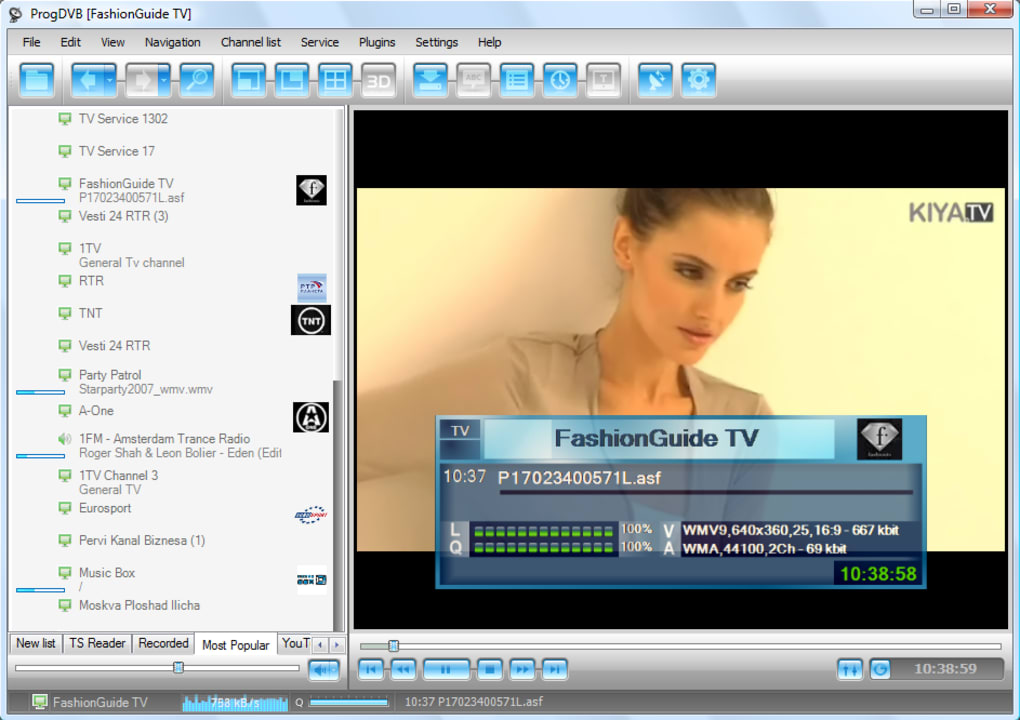
Another major highlight is its support for remote controls. The software recognizes Microsoft RC, HID, and WinLIRC-compatible remotes, allowing you to navigate menus and control playback without touching your keyboard. This is especially useful when using ProgDVB on a home theater setup. The interface is customizable and user-friendly, with support for EPG (Electronic Program Guide), channel lists, and recording schedules. You can even schedule recordings of your favorite shows automatically, ensuring you never miss a moment.
For those interested in international content, ProgDVB bypasses geo-restrictions through its direct stream handling, enabling access to global channels. It supports multiple audio and subtitle tracks, making it ideal for multilingual viewers. Additionally, the software includes a built-in stream analyzer, which helps troubleshoot issues with weak signals or corrupted streams. With regular updates, ProgDVB continues to improve performance, security, and compatibility with new broadcast standards.
How to Install and Use ProgDVB on Your Device
Installing ProgDVB is straightforward and beginner-friendly. First, visit the official website and download the appropriate version for your operating system—Windows, Mac, Android, or iOS. The Windows version is the most feature-rich, while the mobile apps offer a simplified interface ideal for on-the-go viewing. After downloading, run the installer and follow the on-screen prompts. No complex configuration is required for basic setup.
Once installed, launch ProgDVB and go to the “Settings” menu. Here, you’ll need to configure your signal source—whether it’s a DVB tuner, satellite dish, or IPTV stream. For IPTV users, you can import an M3U playlist directly into the software. The software will automatically detect available channels and organize them into a channel list. You can then customize the layout, add logos, and sort channels by category.
To start watching, simply select a channel from the list and click “Play.” The player supports full-screen mode and audio switching. For advanced users, the “Recording” tab allows you to set up time-based or event-based recordings. You can also use the “Timeshift” feature to pause live TV and rewind up to 30 minutes. The software runs efficiently in the background, consuming minimal system resources, even when multiple channels are being monitored.
Compatibility and System Requirements
ProgDVB is designed to be highly compatible across modern devices. The software supports Windows 7 and later (32-bit and 64-bit), macOS 10.12 and above, Android 5.0+, and iOS 12+. This broad compatibility ensures that users can enjoy live TV on desktops, laptops, tablets, and smartphones. Whether you're at home, in the office, or traveling, ProgDVB delivers consistent performance.
For optimal performance, your device should have at least 2 GB of RAM, a modern processor, and a stable internet connection (for IPTV or online streams). If using a DVB tuner, ensure it’s compatible with ProgDVB—most common models like the Terratec Cinergy T Stick or Hauppauge WinTV are supported out of the box. The software also works with various satellite receivers and IPTV providers, though some may require additional configuration.
One of the biggest advantages of ProgDVB is its lightweight design. It doesn’t require high-end hardware, making it accessible even on older machines. The mobile versions are optimized for touchscreens and battery efficiency, ensuring long viewing sessions without draining your device. Regular updates are released to maintain compatibility with new OS versions and broadcast standards, ensuring long-term usability.
Pros and Cons of Using ProgDVB
- Pros:
- Supports multiple input sources: satellite, terrestrial, cable, and IPTV
- Free to download and use with no hidden costs
- Available on Windows, Mac, Android, and iOS
- Remote control support for Microsoft RC, HID, and WinLIRC
- Advanced features like EPG, recording, timeshift, and stream analysis
- Regular updates and strong community support
- Cons:
- Setup can be complex for beginners unfamiliar with DVB standards
- Mobile versions lack some advanced features available on desktop
- Some IPTV streams may require third-party subscription or legal access
- No built-in ad blocker (ads may appear in free streams)
- Interface may feel outdated to users expecting modern UI designs
Frequently Asked Questions (FAQ)
- Is ProgDVB free to use?
-
Yes, ProgDVB is completely free to download and use. The core features are available at no cost, though some advanced tools may require a paid upgrade in certain versions.
- Can I watch live TV on my smartphone with ProgDVB?
-
Absolutely. ProgDVB offers native apps for Android and iOS, allowing you to stream live TV on your smartphone or tablet. The mobile interface is optimized for touch and battery efficiency.
- Does ProgDVB work with satellite TV?
-
Yes, ProgDVB fully supports satellite TV via DVB-S receivers. It can decode signals from satellite dishes and is compatible with most common DVB-S tuners.
- How do I fix buffering issues while watching streams?
-
Buffering can be caused by slow internet or weak signal strength. Try updating your network connection, using a wired Ethernet cable, or adjusting the buffer settings in ProgDVB’s preferences. The built-in stream analyzer can also help diagnose signal problems.
- Is ProgDVB secure and safe to download?
-
Yes, the official ProgDVB website provides secure downloads with digital signatures. Always download from the official source to avoid malware or fake versions.
Final Verdict: Why You Should Download ProgDVB Today
If you're looking for a reliable, feature-packed tool to watch live TV on your computer or mobile device, ProgDVB is an excellent choice. Its support for multiple broadcast standards, cross-platform availability, and advanced recording features make it a top contender in the digital TV software space. While the setup may require some technical know-how, the long-term benefits—such as access to global content and the ability to record live shows—far outweigh the initial learning curve.
Whether you're a casual viewer wanting to catch international news or a tech enthusiast managing a home media center, ProgDVB delivers a secure, stable, and flexible solution. With regular updates and a dedicated user community, this software continues to evolve. Don’t miss out on the world’s best TV content—download ProgDVB today and turn your device into a powerful digital TV hub.
CTA: Download ProgDVB Now – Free, Secure & Compatible with Windows, Mac, Android & iOS







